Product Design · Systems Design · AI-assisted
Workshop Quoting System
A usable quoting V1 that turns tacit workshop knowledge into an explicit decision framework, supporting faster initial estimates while preserving expert judgment for calibration and complex work.
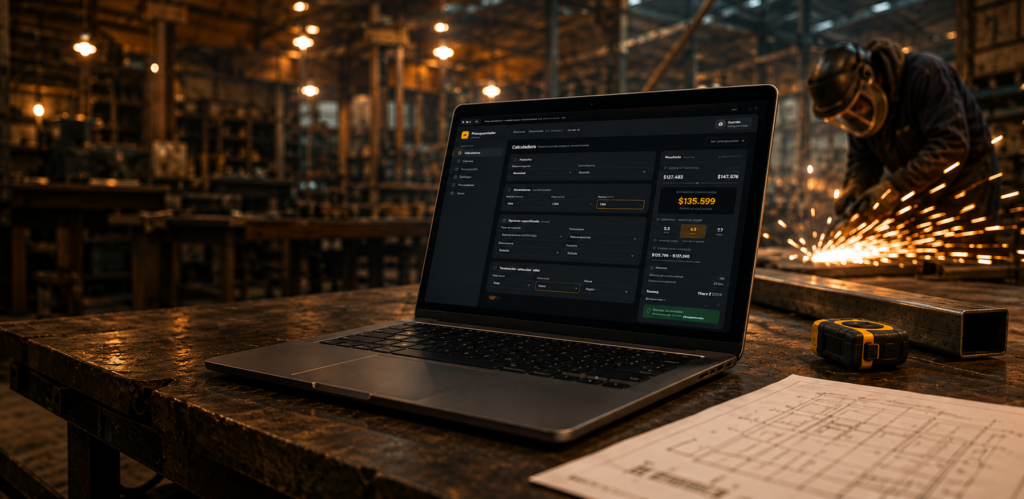
Making workshop pricing knowledge explicit, and connecting it to the work that follows.
Restimator turns a workshop’s undocumented quoting judgment into a working product system. V1 is implemented and in use as a quick estimator; V2 is in active development, extending that logic toward quoting, production, and a more central workflow. The broader system is still evolving, so this case separates what is working from what remains in design.
- Diagnosis and documented criteria
- Google Sheets MVP
- Restimator V1 quick estimator
- V2 quoting and production
- Estimated vs. actual closeout
Current status: the V1 quick estimator is implemented and in use. V2 is in active development across quoting, approvals, and production, with some parts still in design. Restimator is moving toward a central source of truth for the workflow, not claiming that the full cycle is already connected.
Accurate quotes, limited by one person’s time.
Guzmán Villalba is a metal fabrication workshop in Montevideo. Every job, from a custom railing to a batch of parts, starts with a quote. For years, one estimator worked out materials, labor, machine time, and margin from memory and experience. The pricing criteria had never been documented.
As requests increased, work began to queue behind the estimator. New team members needed months of working through quotes with him before they could prepare one independently. Without a written model, the team had no shared way to review, version, or improve the criteria.
A slow quote can cost the workshop a job before fabrication begins.
A customer asking for a rough price needs a quick, credible answer. Preparing a complete formal quote takes time. When that is the only way to respond, and it depends on one person’s availability, the answer can arrive too late or never be sent.
- Pricing criteria lived in one person’s experience, with no written reference.
- There was no quick way to offer an indicative price range without preparing the full quote.
- New quoting team members had to work through requests alongside an experienced estimator until they could handle them independently.
- Request details were split across spreadsheets, physical folders, WhatsApp, and email.
The approximate count includes physical records, digital channels, calculations, and personal knowledge that could be involved depending on the job. It does not mean ten tools were used at once. Restimator already centralizes quick estimates. V2 brings together requests, customers and projects, materials and costs, quotes, status, follow-up, and production in active development. Approvals, workshop documentation, purchasing, and estimated-versus-actual closeout are not yet connected end to end.
Each quote required manual work across disconnected sources
Interviews could only explain part of the process. The estimator found it difficult to put his own rules into words. Following real quotes from start to finish revealed how the work actually happened: his judgment was consistent but undocumented. It could be expressed as a model grounded in the workshop’s conditions, rather than replaced with a generic pricing formula.
Before Restimator
-
Request received
Start -
- Friction point
- Each surface holds information differently. Nothing is centralized at the first point of contact.
-
Step 02 Duplicate a reference spreadsheet Start from a Google Sheets template used on an earlier job rather than a blank sheet.
-
- Friction point
- Much of this search depends on one person’s memory and judgment, rather than a shared, searchable record.
-
Step 04 Calculate and enter costs Adapt formulas to changes in dimensions or stock sizes, calculate surface areas and finishes manually, and enter labor days using Guzmán’s criteria.
-
- Friction point
- Part of the review criteria depended on one person. Quotes accumulated while waiting for review, their status was hard to see, and some completed quotes were held up before reaching the client.
-
- Friction point
- The adjustments are not recorded as reusable rules. Each case is worked out again.
-
Step 07 Re-enter the quote in Zoho / PDF Manually enter the final quote again, this time as a formal document for the client.
-
Step 08 Send to the client
-
End
Quote sent
The workshop could produce sound quotes. The difficulty was how the process depended on one person’s knowledge, scattered information, and repeated adjustments that never became reusable rules. The tools developed during this project addressed those three issues from different angles.
Explore the original workflow ↓
The spreadsheet held pricing rules, materials, and calculations. Trello tracked quotes and jobs by status. Each supported part of the work, but neither brought the full process together.
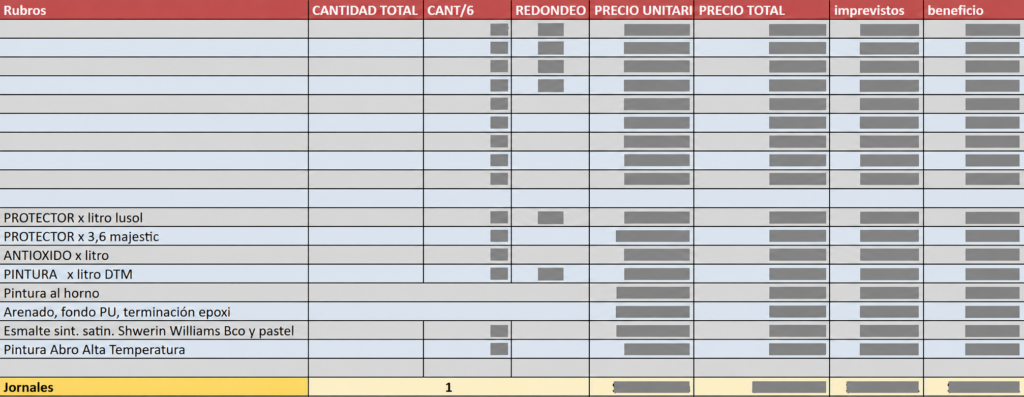
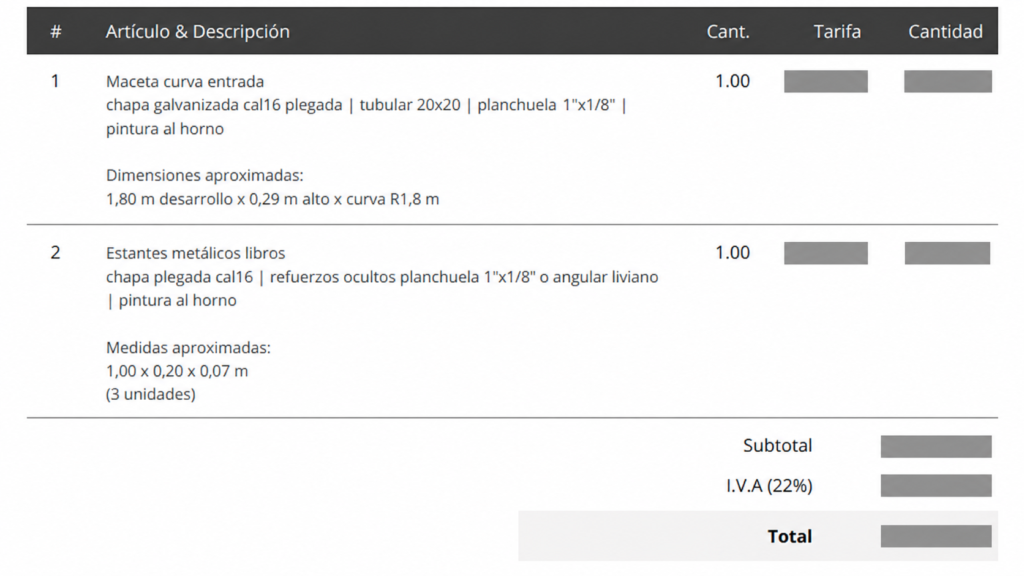
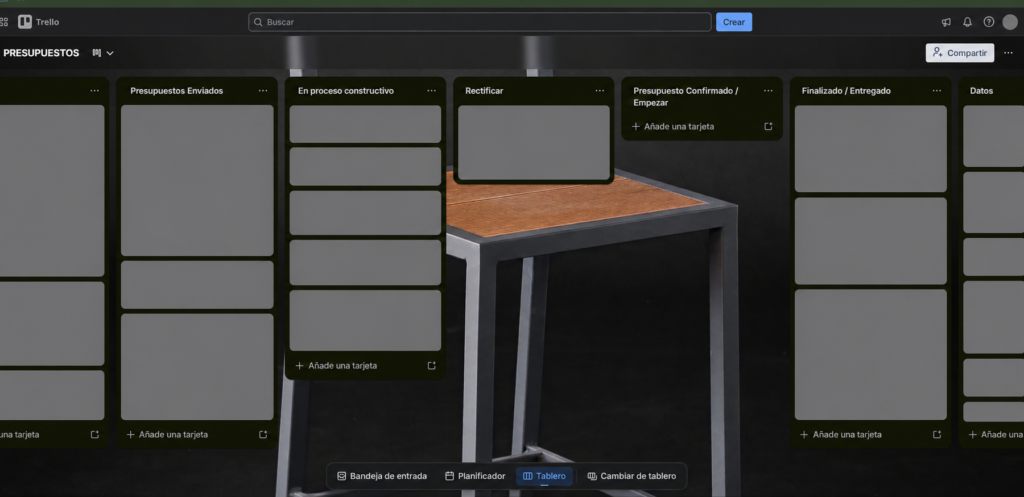
Making tacit knowledge visible
I looked beyond the quoting workflow and mapped the workshop’s product families, variants, materials, and complexity factors. The aim was to understand which parts of the estimator’s knowledge could be documented and reused.
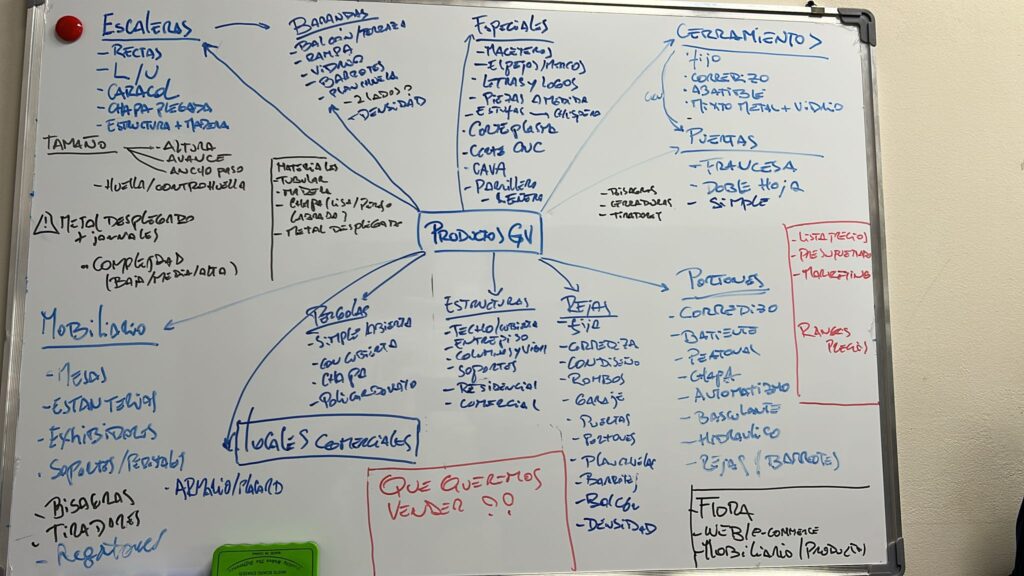
Document the estimator’s criteria without replacing his judgment
My starting hypothesis was to make the pricing model explicit, versioned, and open to review, then separate it from the interfaces using it. The estimator could keep working in a familiar environment while we tested the model. A dedicated interface could come later without rebuilding the pricing logic.
This was a working hypothesis, not a fixed two-stage plan. Smaller solutions could be tested as we understood the operational problem more clearly. The quick estimator was one of those responses, developed alongside the broader work.
Put the pricing logic to work before building an interface
The first product direction addressed the broader problem: a shared materials and pricing database, a catalog to select from instead of copying entries, and prices that could update automatically. I started in Google Sheets with Apps Script so the logic could be built and corrected in a familiar tool. We could compare it against real quotes before investing in a dedicated interface.
Each quote was logged in the spreadsheet, which gradually became a reusable materials and pricing database. That work laid the groundwork for V2’s reusable product templates. The quote history also gave us cases to compare: the model’s result beside the estimator’s judgment. We reviewed differences case by case to find missing variables or incorrect weights, rather than averaging them away. The aim was to make the model explain the estimator’s criteria.
View the early iterations ↓
The first working iteration combined a spreadsheet with Apps Script automation. It brought criteria and previous quotes into a reusable tool, but it was still slow, limited, and difficult to maintain as a product experience.
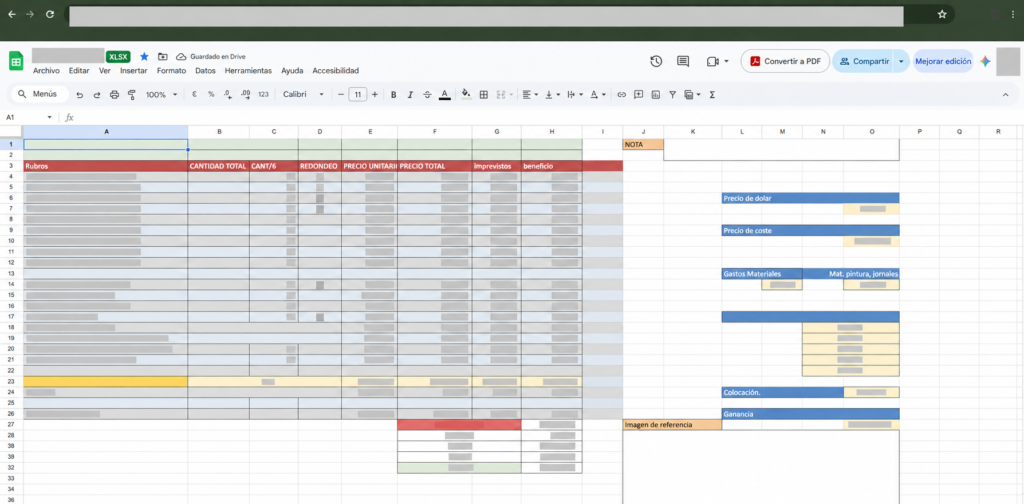
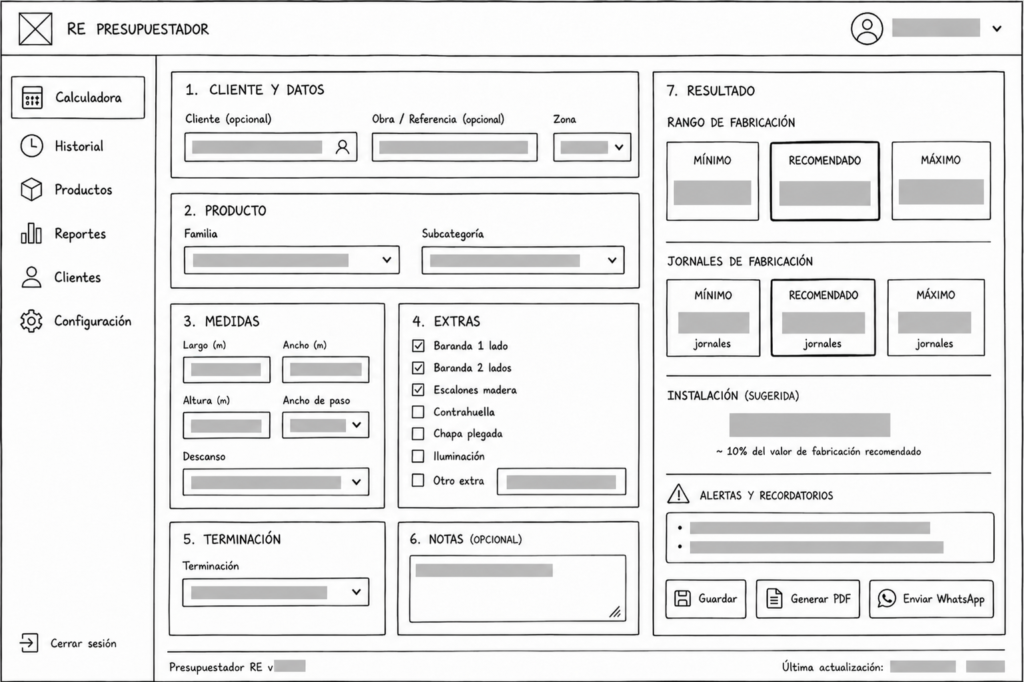
A focused tool developed alongside the larger application
While the materials and pricing database was taking shape, a separate need became clear. Many requests did not yet warrant a complete formal quote. A quick range was enough to decide whether to continue. Restimator addressed that need by classifying the request, asking for essential inputs, and returning a range. It helped answer “Is this worth pursuing?” before anyone worked through the full quote.
Initial hypothesis: estimate before preparing a formal quote
-
Quote request
Start -
Step 01 Quote request The same kinds of requests now enter the tool through one entry point.
-
Step 02 Quick classification Match the request to a family of work the workshop already knows.
-
Step 03 Choose a family / subcategory Railings, gates, structures, and custom pieces each have their own pricing criteria.
-
Step 04 Enter dimensions Enter the essentials, such as length, quantity, and material, without collecting every detail needed for a formal quote.
-
- Status
- IMPLEMENTED. The logic began as formulas in the Google Sheets MVP, then moved into a dedicated web interface.
- Evidence
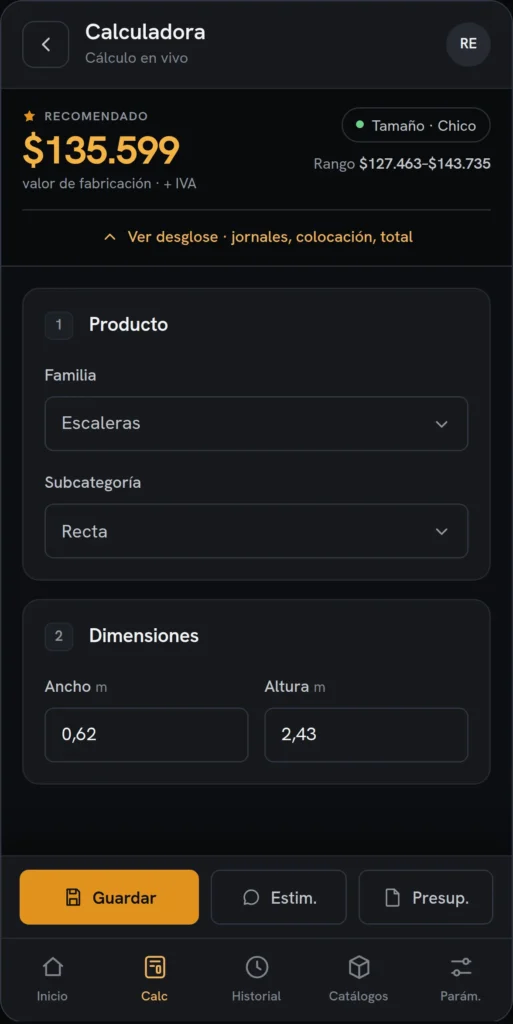
- The V1 dashboard and mobile interface are working tools used by the team.
-
Step 06 Recommended range Get an indicative price range to decide whether to move forward.
-
Step 07 Is a formal quote worth preparing? Introduce an early decision point: stop here if the job does not justify detailed quoting.
-
No Share the preliminary estimate Give the client a quick, clear response without preparing a full quote that may never be used.
-
Yes Move to a formal quote Detailed quoting starts here.
-
End
Formal quote or early response
These figures describe different tasks. Restimator adds an early step: obtain an indicative price range, then decide whether to invest time in a formal quote. The time required for a formal quote varies with complexity.
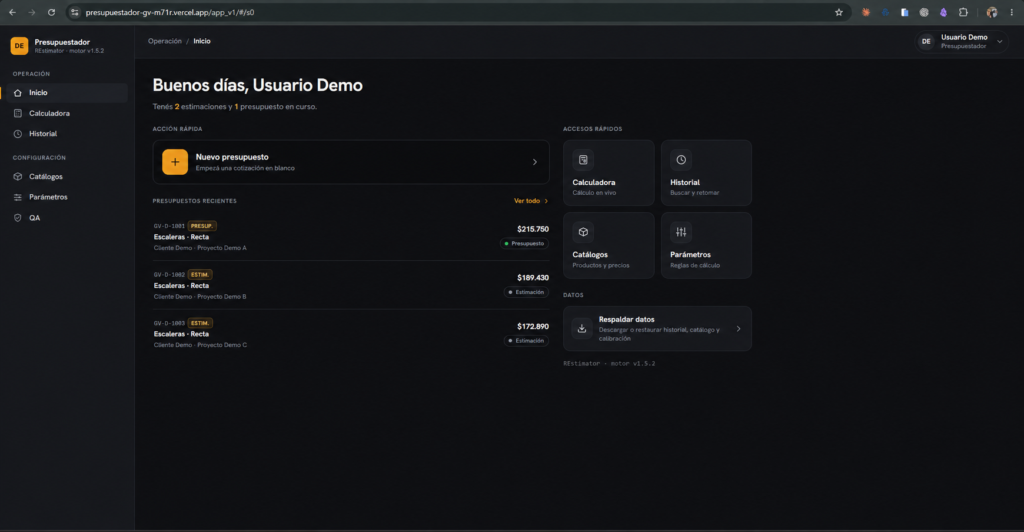

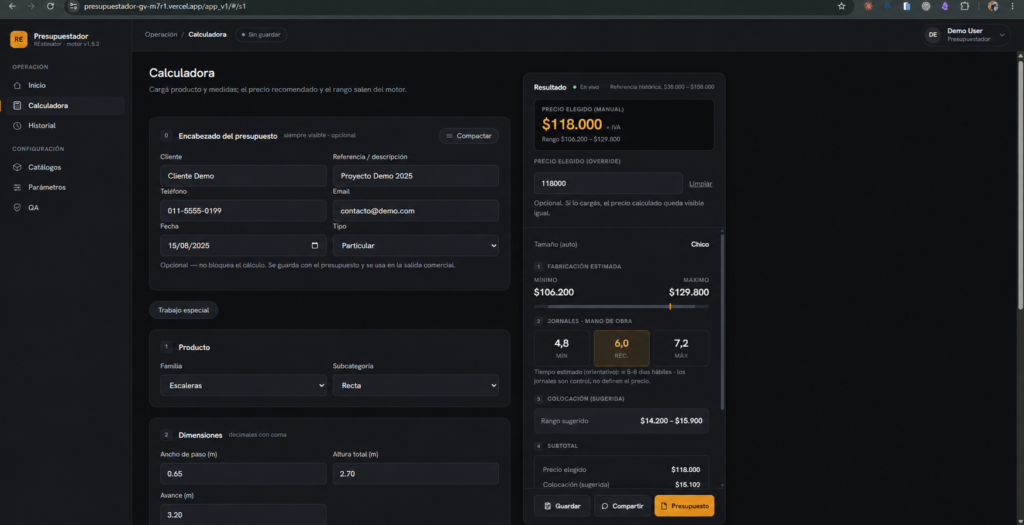
V1 began as formulas in the same spreadsheet before moving into a dedicated web interface. It became a working tool and remains in use. Its purpose is to avoid unnecessary detailed quoting before there is a reason to proceed, while keeping the formal quote as a separate step.
The hardest part was making the pricing judgment explicit
Much of my design work involved helping the estimator express criteria he had never needed to write down. Once those criteria were clear enough to discuss and correct, building the interface was more straightforward.
A simpler formula could have ignored the customer relationship, urgency, or machine availability, but it would have served the workshop poorly. I learned to build around the estimator’s judgment and test the model against it.
I tested usability decisions during daily work, particularly with Irene and other team members. The cycle was practical and repeated: real use → observation → feedback → adjustment → another test. This was iteration within workshop operations, rather than a formal lab study.
The quick estimator answered a specific question: should we continue? The broader work, already being explored in the Sheets MVP, needed to connect quoting with approval, fabrication, and follow-up. V2 addresses that wider operational scope.
Connecting an initial estimate to the work that follows
The materials and pricing database continued to develop alongside the quick estimator. An accepted quote needs to lead to workshop instructions, purchasing, and fabrication. The team also needs a way to compare the estimate with the actual cost of the job. V2 expands on that broader direction, which had been explored from the start.
V2 reuses Restimator’s pricing engine. Separating it from the interface lets it support a more detailed quote with products, materials, labor days, finishes, and services, while retaining the validated logic. The same separation introduced in the MVP now supports a broader application.
Give each decision the space it needs
V1 handled the main calculation well but concentrated too much information and too many decisions in one view. Three priorities shaped V2: traceable decisions, reusable configurations that capture workshop knowledge, and less cognitive load without slowing down the work.
Two explored design directions support this approach: a library of reusable product templates, so recurring workshop knowledge becomes editable configurations, and a conceptual drawing reader to assist dimension extraction while keeping human review and traceability. Both remain PROTOTYPE work: explored and documented, not delivered features.
Multiple modules, states, and screen sizes need consistent behavior as well as consistent styling. The Design System gives those decisions a shared basis.
It documents foundations, tokens, components, and responsive patterns. The core is implemented and in use; extensions that have only been specified remain clearly identified.
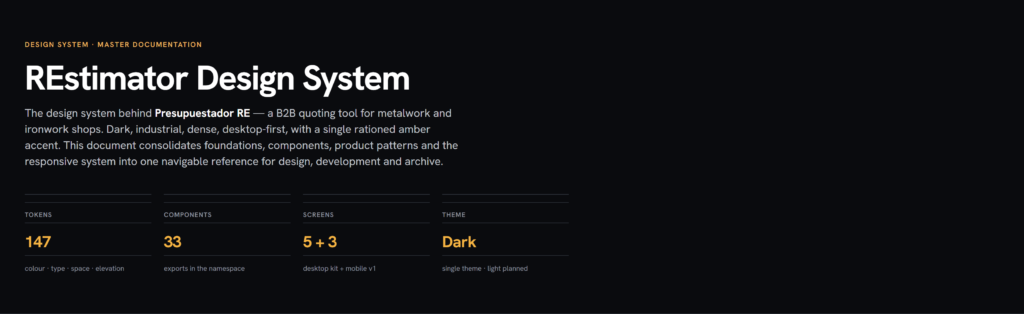
Inside the Design System
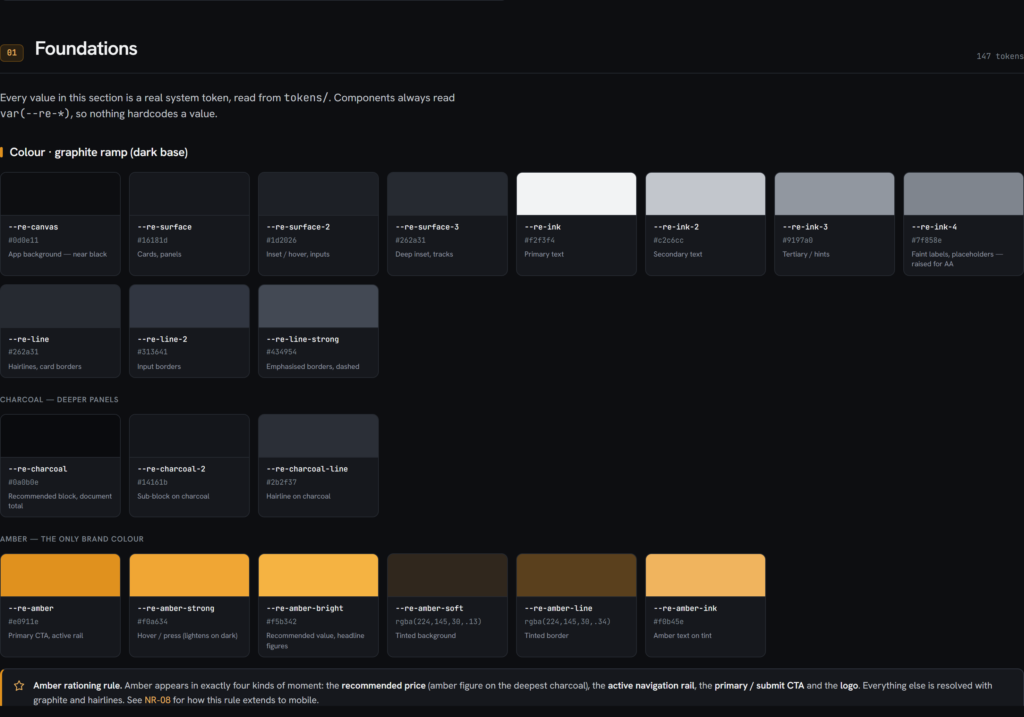
Foundations
IMPLEMENTED. Tokens de color, contraste y acento convierten decisiones visuales en reglas reutilizables.
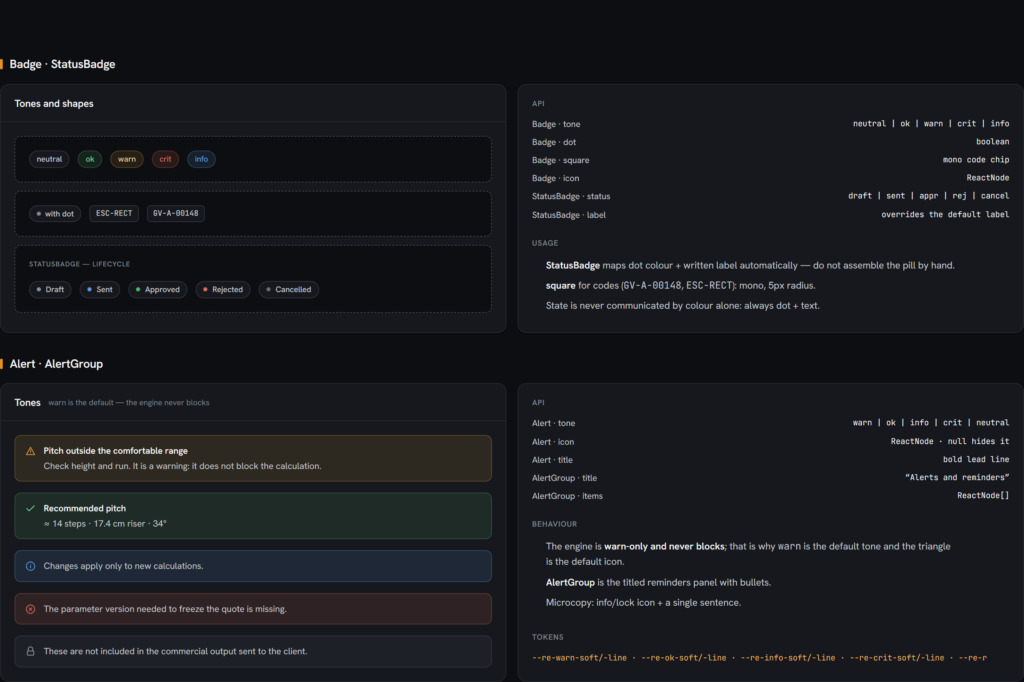
Components
IMPLEMENTED. Estados y validaciones se expresan con componentes consistentes, sin depender únicamente del color.
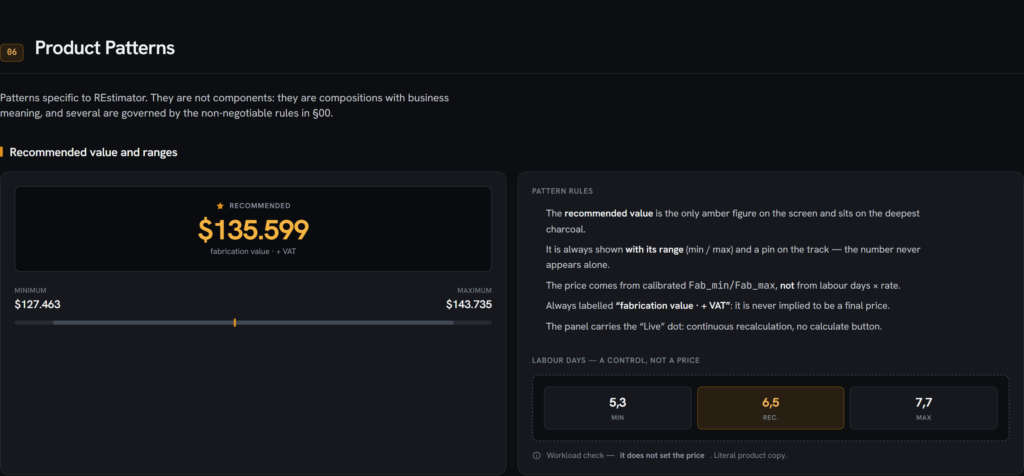
Product Patterns
DOCUMENTED. Una regla de negocio se convierte en un patrón legible y repetible dentro del producto.
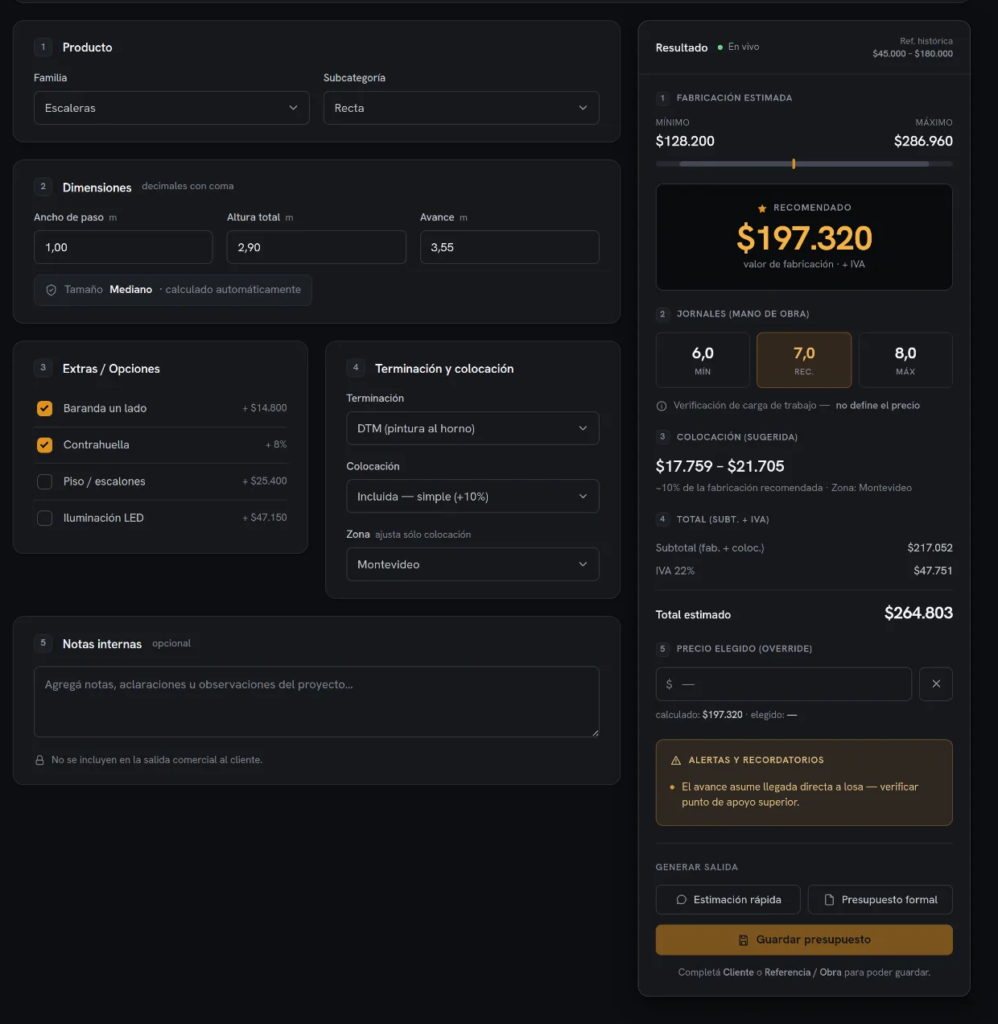
Screen Examples
UI KIT · DOCUMENTED. La calculadora aplica el sistema completo a una superficie de trabajo densa.
Responsive System
SPECIFIED FOR IMPLEMENTATION. Mobile conserva el mismo vocabulario, pero adapta navegación, densidad y acceso al resultado.
Design → Implementation
DOCUMENTED. Foundation → token → component → pattern → screen: la misma decisión se propaga sin volver a definirse en cada superficie.

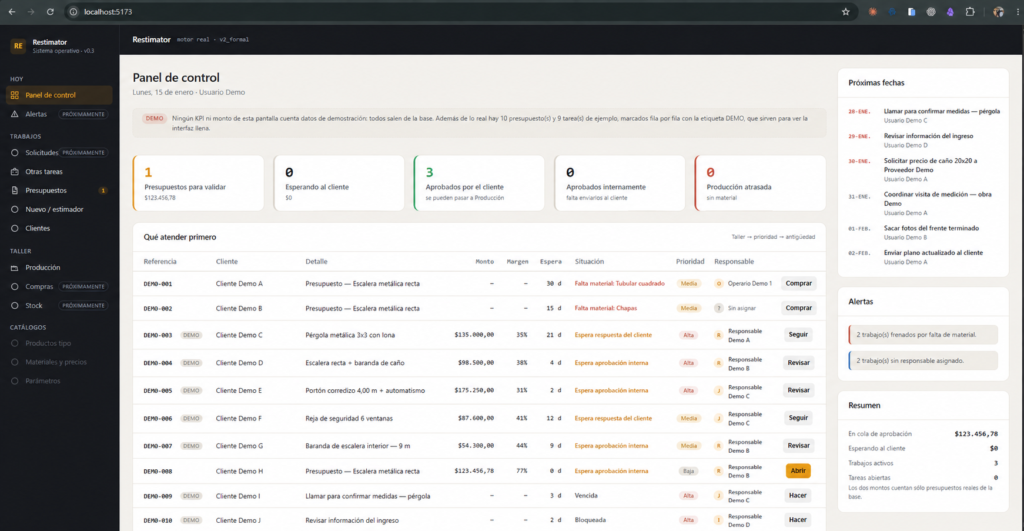
Working V2 features, with the full workflow still in development
These screenshots show implemented features running locally during testing. V2 is in active development, and its full workflow is not yet connected end to end. The localhost address identifies the development environment.
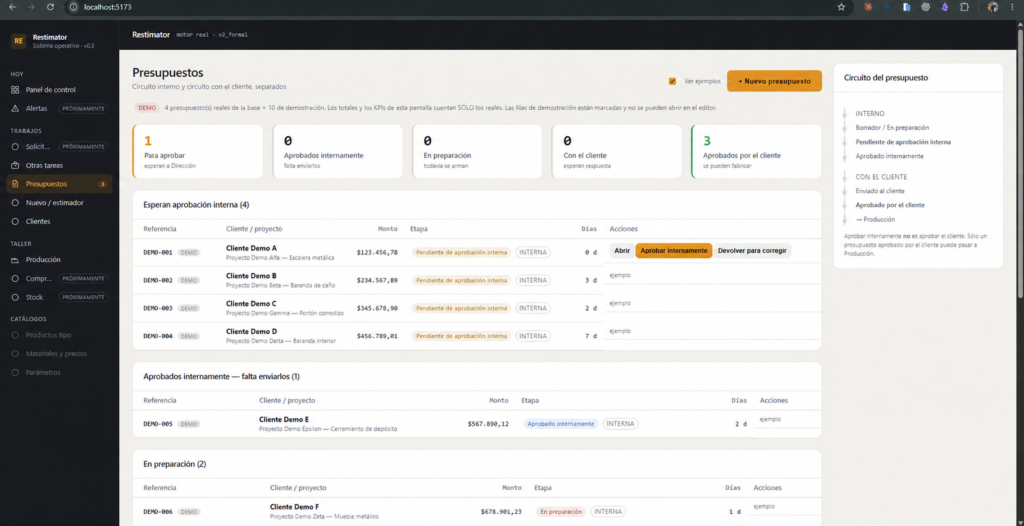
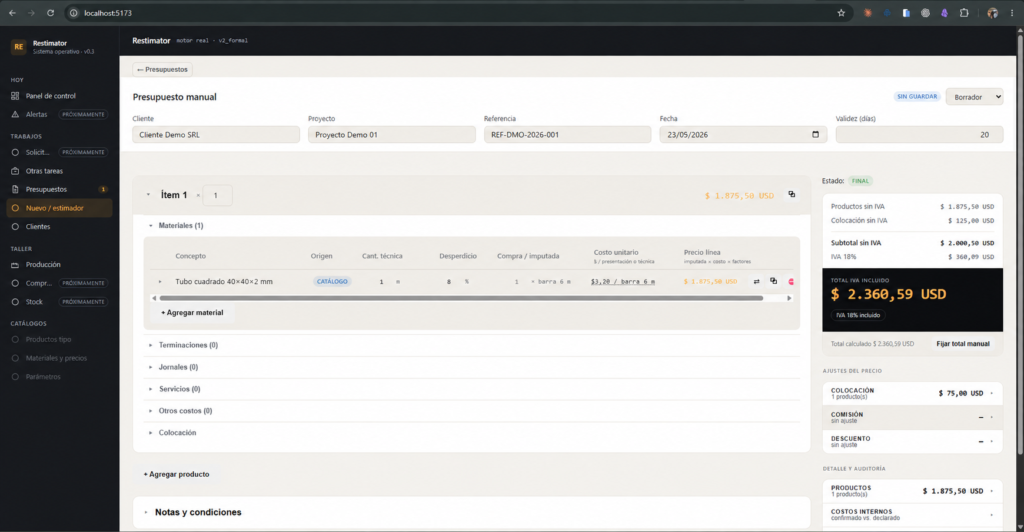
Connecting quoting with workshop operations
The architecture keeps the MVP’s original principle: one pricing model, multiple interfaces. V2 extends it toward quoting, review, approval, production, and closeout. Some steps are implemented and in active development. Others remain prototypes or future work. The diagram identifies the current state of each step.
Reading the states: green identifies implemented features in active development; unaccented steps are in development; muted steps represent design work, prototypes, or future work. Open “View details” for the exact status and evidence attached to each step.
From estimator to workshop operations
-
Request received
Start -
- Status
- IMPLEMENTED · ACTIVE DEVELOPMENT.
- Evidence
- The V2 dashboard brings priorities, quotes, and tracking into one place.
-
- Status
- IMPLEMENTED · ACTIVE DEVELOPMENT. The reusable product template library remains a PROTOTYPE, not the default entry workflow.
- Evidence
- The quote editor already supports this structure in the test environment.
-
Step 03 Calculation engine Use Restimator’s pricing engine with the complete quote structure as its input.
-
- Some quotes need a second review before they can be sent.
- Status
- ACTIVE DEVELOPMENT. Quotes already have statuses and related actions. The criteria for requesting approval are still being refined.
-
- Status
- ACTIVE DEVELOPMENT.
-
- Status
- ACTIVE DEVELOPMENT.
-
- The decision that turns a quote into a job.
- Status
- Designed / ACTIVE DEVELOPMENT. A complete demonstration of this end-to-end sequence is still pending.
-
Follow up / close without approval Record the response and, where appropriate, prepare a revised quote with different conditions.
-
- Status
- IMPLEMENTED · ACTIVE DEVELOPMENT.
- Evidence
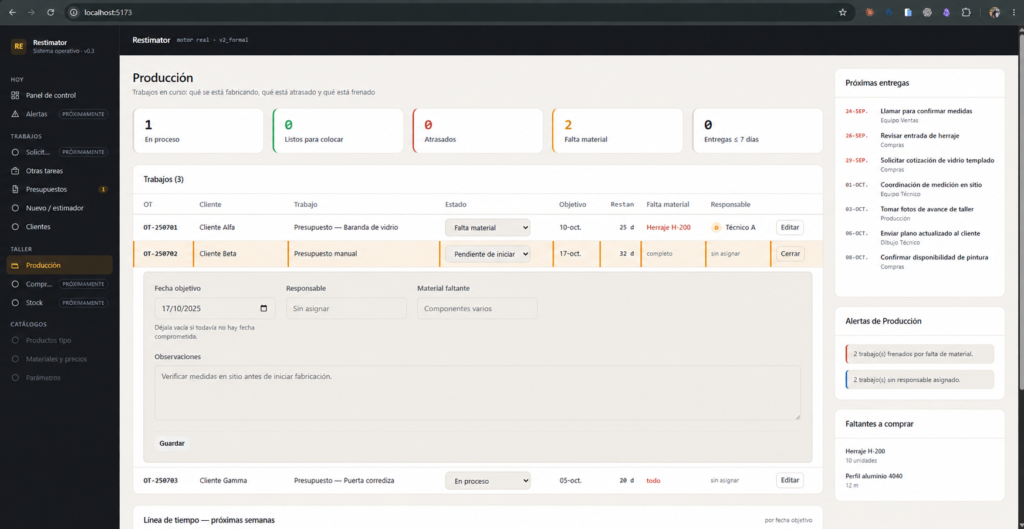
- The production view connects quotes and tasks, linking sales with workshop work.
-
- Status
- PROTOTYPE. The production order is a Product Design proposal, not a delivered feature.
-
- Status
- PROTOTYPE.
-
- Status
- ACTIVE DEVELOPMENT. Fabrication and installation remain hands-on workshop work. The new capability connects that work to quoting and production tracking.
-
- Status
- FUTURE. A complete estimated-versus-actual cost measurement is still missing and is the most important evidence to develop next.
-
End
Workflow completed
The V2 dashboard and production view are implemented and in use, connecting priorities, quotes, follow-up, and tasks. Internal approval, the customer response, workshop documentation, purchasing, and estimated-versus-actual closeout are at different stages of development or design. A complete walkthrough with demonstration data is still missing; it would be the clearest way to show how the full sequence connects.
Parallel ideas, built and tested at different times
The work did not follow a predetermined two-phase roadmap. I broke the operational problem into smaller, testable pieces, with several explored in parallel. Their order here reflects when they could be built and tried, not necessarily when the ideas first emerged.
How the scope developed
-
Step 01 Google Sheets Explore the broader problem from the start: a workshop-owned materials and pricing database in a spreadsheet, where the idea can be tested quickly.
-
Step 02 Quick estimator V1 In parallel, address a smaller, specific need with an implemented tool the team can use.
-
Step 03 Decoupled engine The materials and pricing database continues to develop while its logic is separated from the interface that uses it.
-
Step 04 Formal quoting V2 Extend that foundation into a complete, traceable quote with materials, labor days, finishes, and services in one place.
-
Step 05 Client and supplier data Start retaining a shared record of who the workshop has worked with and what was used.
-
Step 06 Workflow and approvals Give quoting a set of statuses instead of treating it as a single event.
-
Step 07 Production Connect approved quotes with work on the workshop floor.
-
Step 08 Modular system A direction for development, not a completed feature set. Validate each module before treating it as established.
Turning an approved quote into instructions for the workshop
A production view connecting quotes, priorities, and tasks is already implemented and in use. Technical workshop documents, including parts breakdowns and cut lists, and purchasing workflows remain design proposals. Those pieces still need to become working features.
The proposed production order turns costs and commercial decisions into workshop instructions. The purchasing exploration connects production requirements with supply needs. Both are documented Product Design proposals, not modules currently in use.
What is working, what is being calibrated, and what comes next
Restimator is in real use and active development. The summary below separates working features and observed evidence from ongoing calibration, unfinished workflows, and outcomes that still need to be measured.
- Pricing criteria are documented and versioned, giving the team a shared reference beyond one person’s knowledge.
- Restimator V1 is implemented on desktop and mobile. It is used with real requests and returns an indicative price range in ≤5 minutes for supported product families.
- V2 features implemented in ACTIVE DEVELOPMENT include requests linked to customers and projects, the dashboard, quote inbox and editor, materials and costs, status, follow-up, and production.
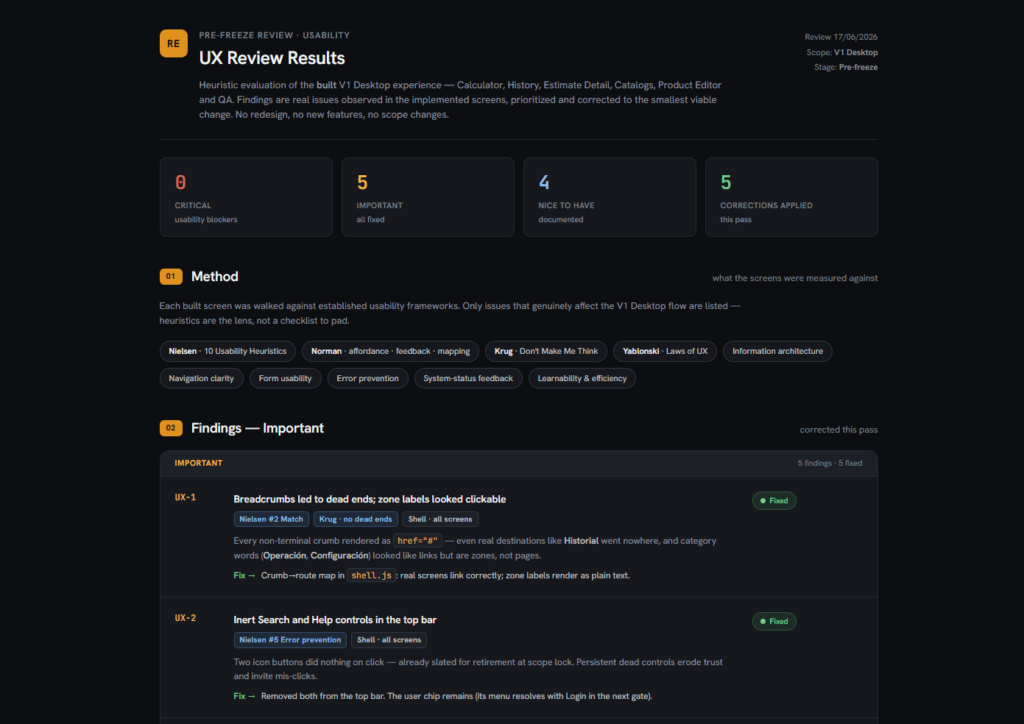
- The model has passed regression tests using historical cases, alongside structured UX and accessibility reviews.
- CALIBRATION: ranges, weights, margins, and product-family rules are still being adjusted against real cases.
- IN DEVELOPMENT: internal approval, the customer response, and connected execution are not yet complete end to end.
- PROTOTYPE: reusable product templates, workshop documentation, and purchasing remain design proposals, not delivered modules.
- FUTURE / TO MEASURE: estimated-versus-actual closeout, time to prepare a full quote, backlog, approval, rework, adoption, and independent use.
AI’s role in this project: AI tools supported development and documentation. They helped structure criteria from the diagnosis, assisted V1 coding, and organized project documentation. Embedded AI features such as photo interpretation, suggested price ranges, or anomaly detection are not confirmed as implemented.
- Unusual or highly customized work still requires manual judgment. The model covers common patterns rather than every possible job.
- The estimation engine needs a larger quote history to stay accurate as material costs change.
- The estimator must continue reviewing and correcting the model; its criteria do not maintain themselves.
The work ahead
Complete the approval and customer communication workflow
Connect preparation and review with internal approval, customer communication, and follow-up. Completing that sequence would reduce external handoffs and make each decision easier to trace.
Build the production documentation and purchasing proposals
Turn the workshop documentation, material requirements, and purchasing prototypes into working features linked to approved quotes. The aim is to support fabrication without scattering the information across tools again.
Compare estimates with actual outcomes
Record hours and labor days, material use, and actual fabrication and installation outcomes. Comparing those records with the estimate would provide a stronger basis for calibrating the pricing model.
Extend the model to unusual and custom work
Unusual and highly customized jobs still require expert judgment. The aim is to document and reuse more of that knowledge while keeping the estimator involved.